Events
In this section, we will go over how to create events for your bot. Events are actions that happen on Stoat. Your bot can "listen" to these events and run code in response. Some common events include:
- messageCreate - Someone sends a message
- messageReactionAdd - Someone reacts to a message
- ready - Your bot successfully logs in
- serverMemberJoin - Someone joins the server
The template comes with some events in the src/events/ folder.
Creating Your First Event
Let's create a simple event that logs when someone sends a message:
import { Event } from "@/classes/event";

export default new Event({
  name: "messageCreate",
  description: "Logs every message sent in the server",
  execute: (client, message) => {
    console.log(`${message.author?.username}: ${message.content}`);
  },
});
When someone sends a message, the bot will log the username and the content of the message in the console.
Create a file
In src/events/, create a new file called messageCreateLog.ts.
Type the following code
export default new Event({});Fill in the required properties
import { Event } from "@/classes/event";

export default new Event({
  name: "messageCreate",
  execute: (client, message) => {},
});
Add optional properties
We do not need
once: false because false is the default value for once.import { Event } from "@/classes/event";
export default new Event({
name: "messageCreate",
description: "Logs every message sent in the server or DM",
execute: (client, message) => {},
});Write your code in execute
import { Event } from "@/classes/event";

export default new Event({
  name: "messageCreate",
  description: "Logs every message sent in the server or DM",
  once: false,
  execute: (client, message) => {
    console.log(`${message.author?.username}: ${message.content}`);
  },
});
Save the file and test your event
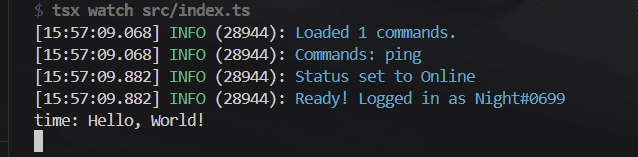
Run your bot and send a message in a server. You should see the message logged in the console.
Properties
The template provides an Event class that you can use to create event handlers. You can find the Event class in the src/classes/Event.ts file.
Prop
Type