Commands
In this section, we will go over how to create commands for your bot. Commands are the main way users will interact with your bot.
The template comes with an example command called ping. You can find it in the src/commands/ping.ts file. This command will reply with the latency of the bot when a user types !ping.

Structure
The template provides a Command class that you can use to create commands for your bot. You can find the Command class in the src/classes/Command.ts file.
Commands are created using the following structure:
new Command({
  name: string;
  description?: string;
  aliases?: string[];
  cooldown?: number;
  permission: PermissionLevel;
  execute: (client: Client, message: Message) => Promise<any> | any;
});
Understanding Each Property
Let's break down what each property means and how to use them:
name (required)
This is the name of your command. When a user types your command prefix followed by this name, the command will run.
Example: If command's name is "hello", users will type !hello to run it.
description (optional)
A short explanation of what your command does. This helps users understand what the command is for and is often shown in help menus.
Example: "Greets the user with a friendly message"
aliases (optional)
Alternative names for the command. If you have a command called "hello", you can add aliases like ["hi", "hey"]. Users can type any of these names to run the same command.
Example: aliases: ["hi", "hey", "greet"] means users can type !hi, !hey, or !greet to run the "hello" command.
cooldown (optional)
Prevents the command from being used too frequently by the same person. The number is in seconds.
Example: cooldown: 5 means each person can only use this command once every 5 seconds. This is useful for preventing spam.
permission (required)
Controls who is allowed to use the command. You must specify a PermissionLevel:
PermissionLevel.User- Anyone can use itPermissionLevel.Moderator- Only moderators can use itPermissionLevel.Admin- Only server admins can use itPermissionLevel.Owner- Only the server owner can use itPermissionLevel.BotOwner- Only the bot owner (you) can use it
You can modify the permission levels in the src/classes/command.ts file.
Example: permission: PermissionLevel.User allows anyone to use the command.
execute (required)
This is the actual code that runs when someone uses the command. It receives:
client- Your bot instancemessage- The message object that triggered the command
Example:
execute: (client, message) => {
  message.reply("Hello, world!");
};
Creating Your First Command
Let's create a simple hello command:
import { Command, PermissionLevel } from "@/classes/commnd";

export default new Command({
  name: "hello",
  description: "Greets you with a friendly message",
  aliases: ["hi", "hey"],
  cooldown: 3,
  permission: PermissionLevel.User,
  execute: async (client, message) => {
    await message.reply(`Hello ${message.author?.username}! 👋`);
  },
});
When someone types !hello (or !hi or !hey), the bot will reply with a greeting.
Making the Command
- Create a new file in
src/commands/calledhello.ts - Type the following code
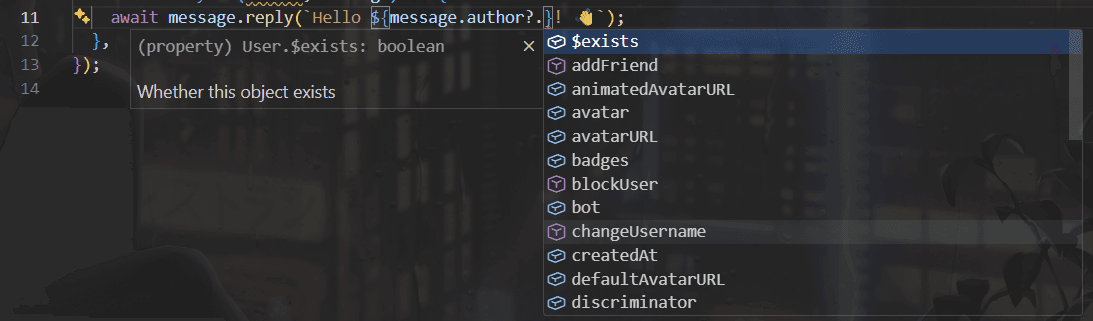
export default new Command({});You might've noticed that when you start typing new Command, you get suggestions for the properties you can add. This is called intellisense. You can press Enter or Tab to quickly add the properties you need.

- Fill in the required properties
import { Command, PermissionLevel } from "@/classes/commnd";

export default new Command({
  name: "hello",
  permission: PermissionLevel.User,
  execute: async (client, message) => {},
});- Add optional properties
import { Command, PermissionLevel } from "@/classes/commnd";

export default new Command({
  name: "hello",
  description: "Greets you with a friendly message",
  aliases: ["hi", "hey"],
  cooldown: 3,
  permission: PermissionLevel.User,
  execute: async (client, message) => {},
});- Write your code in execute
import { Command, PermissionLevel } from "@/classes/commnd";

export default new Command({
  name: "hello",
  description: "Greets you with a friendly message",
  aliases: ["hi", "hey"],
  cooldown: 3,
  permission: PermissionLevel.User,
  execute: async (client, message) => {
    await message.reply(`Hello ${message.author?.username}! 👋`);
  },
});- Save the file and test your command by running your bot and typing
!helloin a server or DM.

Explanation of the Code in execute
In the execute function, we use message.reply() to send a response back to the user who triggered the command. The message includes a greeting and the username of the person who used the command.
message is an object that contains information about the message that triggered the command, including the author, content, and more. By using message.author?.username, we can get the username of the person who sent the command.
The reason why we see a ? after author is because the author might be undefined. The ? prevents errors in case author is not available for some reason.
Visual Studio Code's intellisense will show you all the properties and methods available on the message object and app ? when needed.